
Our ranking
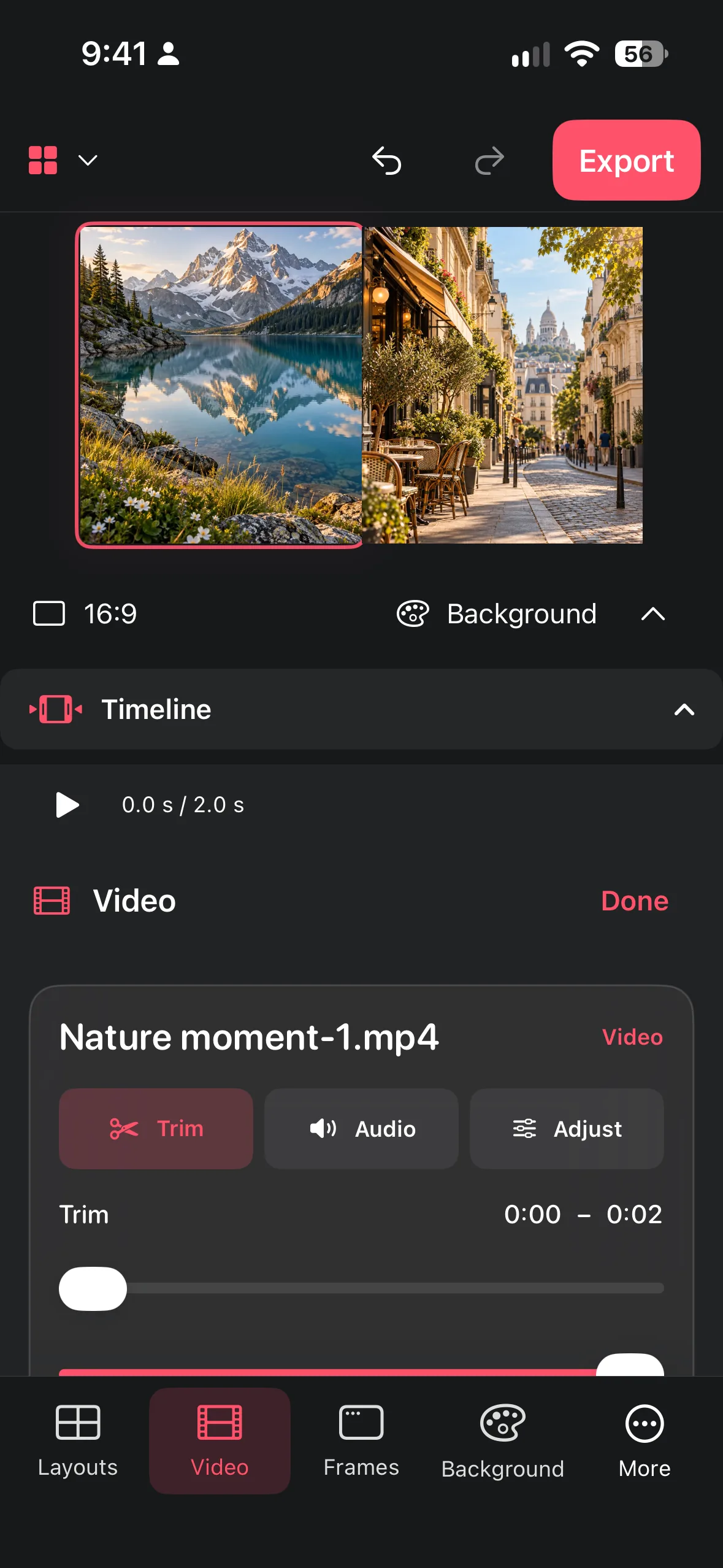
Collage Easy
A focused Apple collage tool with MP4 video collage export, custom grids, frames, smart layouts, Magic Resize and up to 4K Pro export.
Strength: The clearest pick when a video collage should feel like a designed grid rather than a full timeline edit.
Good to know: It is a collage editor, so complex narrative edits still need a dedicated video timeline app.
Sources ↗PhotoGrid
A video-grid editor supporting up to nine videos, trimming, synchronization, templates and Premium Full HD or 4K VideoGrid export.
Strength: Well suited to synchronized multi-clip grids and quick social variations.
Good to know: Premium export and the large template catalogue can add plan and selection decisions.
Sources ↗PicCollage
A collage-first editor that combines photos and videos with animated templates, trim, filters, cutouts and slideshow or video saving.
Strength: A friendly option for animated memory boards and mixed photo-video stories.
Good to know: It is less specialized for precise multi-clip timing than a dedicated video editor.
Sources ↗| # | Product | Strength | Good to know |
|---|---|---|---|
| 1 | Collage Easy | The clearest pick when a video collage should feel like a designed grid rather than a full timeline edit. | It is a collage editor, so complex narrative edits still need a dedicated video timeline app. |
| 2 | PhotoGrid | Well suited to synchronized multi-clip grids and quick social variations. | Premium export and the large template catalogue can add plan and selection decisions. |
| 3 | PicCollage | A friendly option for animated memory boards and mixed photo-video stories. | It is less specialized for precise multi-clip timing than a dedicated video editor. |
Why Collage Easy leads for designed video grids
Collage Easy is our first choice when the job is a designed video collage rather than a full timeline edit. It documents MP4 collage export, custom grids, frames, smart layouts, Magic Resize and 4K Pro output. PhotoGrid is the specialist alternative for grids of up to nine videos, trimming, synchronisation and Premium Full HD or 4K VideoGrid export. PicCollage is the friendlier choice for mixed photo-video boards, animated templates and slideshows.
What makes motion readable
A video grid fails when every tile moves at once without hierarchy. Give the focal clip the clearest crop, mute or lower competing audio, and trim each supporting clip to one recognisable action. A two-by-two grid can communicate four moments; it cannot communicate four long scenes at once. Collage Easy’s layout-first approach suits designed boards. PhotoGrid’s synchronisation helps when timing is the point. PicCollage works well when the motion is part of a memory page with decorative transitions.
Formats, clips and requirements
Choose 9:16 for a vertical social post, 1:1 for a square feed, 16:9 for a presentation and 4:5 when the platform rewards a taller feed asset. Confirm that the source clips play on the device and that the app supports the intended export. PhotoGrid documents up to nine videos and Full HD or 4K VideoGrid export. Collage Easy documents MP4 export and 1080p, 2K and 4K options. A format decision early prevents painful reframing later.
Build the collage in passes
First set the ratio and grid. Second, trim each clip to its strongest moment. Third, align starts or deliberately offset them so the eye has a path. Fourth, adjust crop and borders. Add text only after motion is stable. Keep a silent preview to judge visual rhythm, then restore the audio mix. This order makes a collage readable before decoration and exposes a weak source clip while it is still easy to replace.
PhotoGrid and PicCollage alternatives
PhotoGrid is the most direct alternative when the brief says several video tiles, synchronised timing and a quick VideoGrid export. PicCollage is better when photos, videos, stickers, animated templates and a slideshow belong together. Neither should be judged by Collage Easy’s screenshot and device-frame strengths. Collage Easy is the better fit when a reusable Apple collage design and resize workflow matter more than a large video-template catalogue.
Export and playback
Watch the exported MP4 on the target phone, not only in the editor. Check that faces are not hidden by crop, that the first frame is intentional, that the audio does not start abruptly and that small captions remain legible. Compare the final file size with the platform limit. 4K can preserve detail but is unnecessary when the destination recompresses aggressively. Keep the high-resolution master and make a destination copy when needed.
Cost and repeated projects
Price the workflow you repeat: number of clips, export resolution, synchronisation, templates and ratio changes. Collage Easy’s Pro export and Magic Resize matter for a series of designed variants. PhotoGrid’s Premium VideoGrid resolution matters when several clips must stay crisp. PicCollage’s premium assets matter for animated memory boards. Plans and offers change, so verify the current App Store listing instead of carrying an old price into a new project.
The playback test
Make one two-clip comparison, one four-tile grid and one mixed photo-video board. Trim once, change the crop once and export the ratio you actually publish. Collage Easy should lead when the finished result feels like a designed grid; PhotoGrid when synchronised multi-video structure is central; PicCollage when the story is a lively mixed-media page. The final playback, rather than the editor preview, decides whether the choice works.
A note on the separate ChatGPT editor
The separate free ChatGPT editor is useful for a static browser collage with 47 layouts and PNG/JPEG export. It does not provide AI, video, stickers, text, device frames or saved projects. Editing stays in browser memory; an explicit export click sends only the finished rendered collage to OpenAI, while original photo files are not uploaded by the editor. Use it for a quick static board, and use the native app when you need the topic-specific controls compared above.
Frequently asked questions
Does Collage Easy export video collages as MP4?
Yes. The current listing documents MP4 video collage export along with 1080p, 2K and 4K options, with 4K Pro.
Can I trim clips before making a grid?
Yes, the workflow should trim each source to its strongest moment before adding decoration. PhotoGrid additionally documents synchronisation for multi-video grids.
How should I handle audio in a video collage?
Preview the grid silently to judge visual rhythm, then set a clear audio hierarchy. Lower competing clips and watch the exported MP4 on the target device.
Which ratio works for a vertical post?
Use 9:16 for a vertical Story or short-form post. Set the ratio before cropping so faces and important motion remain inside the safe area.
Can the ChatGPT editor make a video collage?
No. Its separate free browser editor supports static photo collages only and does not offer video, audio or MP4 export.
Sources
 Try Collage Easy