
Our ranking
Collage Easy
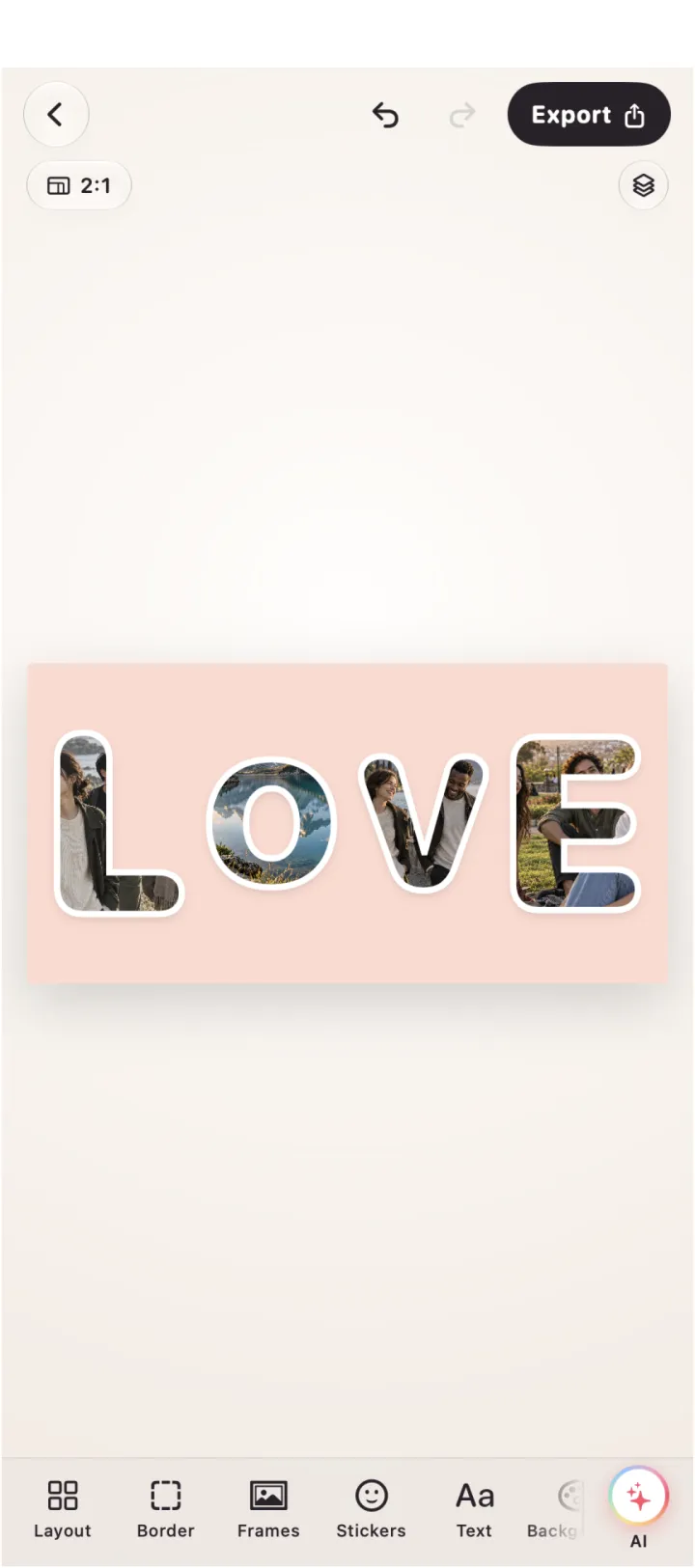
A shape-led Apple collage maker with hearts, circles, stars and moons, word collages, 10 fonts, stickers, frames and smart layouts.
Strength: A purposeful choice for a finished visual with a clear motif instead of a generic grid.
Good to know: Word collages allow up to 12 characters, so longer phrases need a different treatment.
Sources ↗PicCollage
A playful collage editor with freestyle boards, shape cutouts, curved text, stickers, backgrounds, templates and AI cutouts.
Strength: Excellent for scrapbook energy and fast experimentation with layers.
Good to know: Its abundance of decoration can compete with a carefully edited photo sequence.
Sources ↗MOLDIV
A photo editor with 194 frames, 100 magazine layouts, adjustable aspect ratios, filters, stickers, text and high-resolution saving.
Strength: A compelling route for editorial grids and magazine-inspired compositions.
Good to know: Its listing documents a large editing toolkit but does not establish a specific AI privacy model.
Sources ↗| # | Product | Strength | Good to know |
|---|---|---|---|
| 1 | Collage Easy | A purposeful choice for a finished visual with a clear motif instead of a generic grid. | Word collages allow up to 12 characters, so longer phrases need a different treatment. |
| 2 | PicCollage | Excellent for scrapbook energy and fast experimentation with layers. | Its abundance of decoration can compete with a carefully edited photo sequence. |
| 3 | MOLDIV | A compelling route for editorial grids and magazine-inspired compositions. | Its listing documents a large editing toolkit but does not establish a specific AI privacy model. |
Why Collage Easy leads for shaped photo ideas
Collage Easy is our first choice when the collage begins with a visual motif: a heart, circle, star or moon shape, a short word collage, a frame or a deliberate photo story. PicCollage is the lively alternative for freestyle layers, stickers, curved text and AI cutouts. MOLDIV is the editorial alternative with 194 frames, 100 magazine layouts and adjustable aspect ratios.
Shapes should carry meaning
A shaped collage works when the silhouette supports the subject. Use a heart for a relationship story, a star for a highlight board or a circle when the photos should feel like a collection. Collage Easy documents 45 photo shapes and smart layouts; start with fewer images than the maximum so faces remain readable. PicCollage gives more freedom to cut photos into stars, hearts and other forms. MOLDIV’s frame-led approach is better when the magazine rectangle, not the silhouette, is the organising idea.
Word collages and typography
Collage Easy documents word collages with ten fonts and a limit of up to twelve characters. That constraint is useful: choose a name, place or short feeling instead of forcing a sentence into the image. PicCollage offers fonts, curved text and decorative layers; MOLDIV documents more than 100 fonts alongside its frames. Compare letter spacing, contrast and placement at thumbnail size. A word should guide the eye, not become another sticker competing with the faces.
A practical creative workflow
Collect a small set of images with a shared colour or subject, choose the shape or frame, then fill the strongest areas first. Keep one quieter image for breathing room. Adjust spacing before adding filters. If a background removal or sticker changes the story, save a version without it. This order prevents the common problem of using decoration to rescue weak image selection. It also makes it easier to compare a clean editorial version with a more playful variation.
Freestyle, magazine and frame-led choices
PicCollage is the most natural pick for a scrapbook board assembled from layers, stickers and backgrounds. MOLDIV is compelling for a magazine spread with a defined frame, aspect ratio and filter treatment. Collage Easy sits between those extremes: its shapes, word collages, custom grids, frames and smart layout tools can make a motif feel designed without requiring a large template search. Choose the editing model you enjoy revising, not merely the library that looks largest.
Export and mood
A creative collage can lose its character through an unsuitable crop or a low-resolution export. Choose the destination first: square post, portrait Story, phone wallpaper or print. Inspect a dark background for clipped shadows and a light background for weak text contrast. MOLDIV documents high-resolution saving; Collage Easy documents high-resolution and 4K Pro options; PicCollage output depends on the current plan. Export once at the required size and keep the editable source.
Cost and asset limits
List the exact premium item you need: a particular frame, font, sticker, cutout action or resolution. Collage Easy’s Pro features and word-collage controls may be more useful than a huge asset catalogue for a repeatable motif. PicCollage’s VIP library helps when variety is the point. MOLDIV’s frame and magazine strengths may justify it for editorial work. Check current storefront terms and avoid treating a free download as proof that every creative asset is included.
The final edit pass
Before publishing, hide one effect and inspect the collage again. Tighten one gap, remove one competing sticker and check that the word remains readable. Ask whether the eye lands on the intended photo in two seconds. Collage Easy should win when a clear shape or short word carries the idea; PicCollage when layered play is the idea; MOLDIV when the magazine frame is the idea. The final subtraction makes that distinction visible.
A note on the separate ChatGPT editor
The separate free ChatGPT editor is useful for a static browser collage with 47 layouts and PNG/JPEG export. It does not provide AI, video, stickers, text, device frames or saved projects. Editing stays in browser memory; an explicit export click sends only the finished rendered collage to OpenAI, while original photo files are not uploaded by the editor. Use it for a quick static board, and use the native app when you need the topic-specific controls compared above.
Frequently asked questions
How long can a Collage Easy word be?
The current listing documents word collages with up to twelve characters and ten fonts. Use a name, place or short feeling rather than a sentence.
Which app is best for shaped photos?
Collage Easy documents 45 shapes, PicCollage supports cutouts into shapes and MOLDIV is stronger for frame-led magazine layouts.
Which app is suitable for print?
Choose the app that provides the required resolution and ratio, then inspect the exported file at full size. Collage Easy and MOLDIV document high-resolution export.
What does Pro add to the creative workflow?
The useful Pro feature is the one you repeatedly need, such as a particular frame, high-resolution export, resize or premium asset. Check the current plan.
How do I keep stickers from overwhelming a collage?
Finish the photo hierarchy first, then remove one competing effect and check whether the main subject and word remain readable at thumbnail size.
Sources
 Try Collage Easy